


New, smooth way of working with new Dynacord devices in OCA-controlled (AES70) sound systems, and more.
Intuitive, guided workflow to design, control, and supervise small to large sound systems
Integrated system visibility and direct access – see parameters system wide in “speaker view” and permanently editable – if required
Dedicated interaction design featuring a time-saving fly-out concept
SONICUE Control for customized control panels running as standalone applications on PCs, TPC-1 or iOS devices
Supports of the powerful Task Engine in MXE5 for creation of advanced tasks without coding skills
Working with loudspeaker data libraries of Electro-Voice and other loudspeaker brands
SONICUE
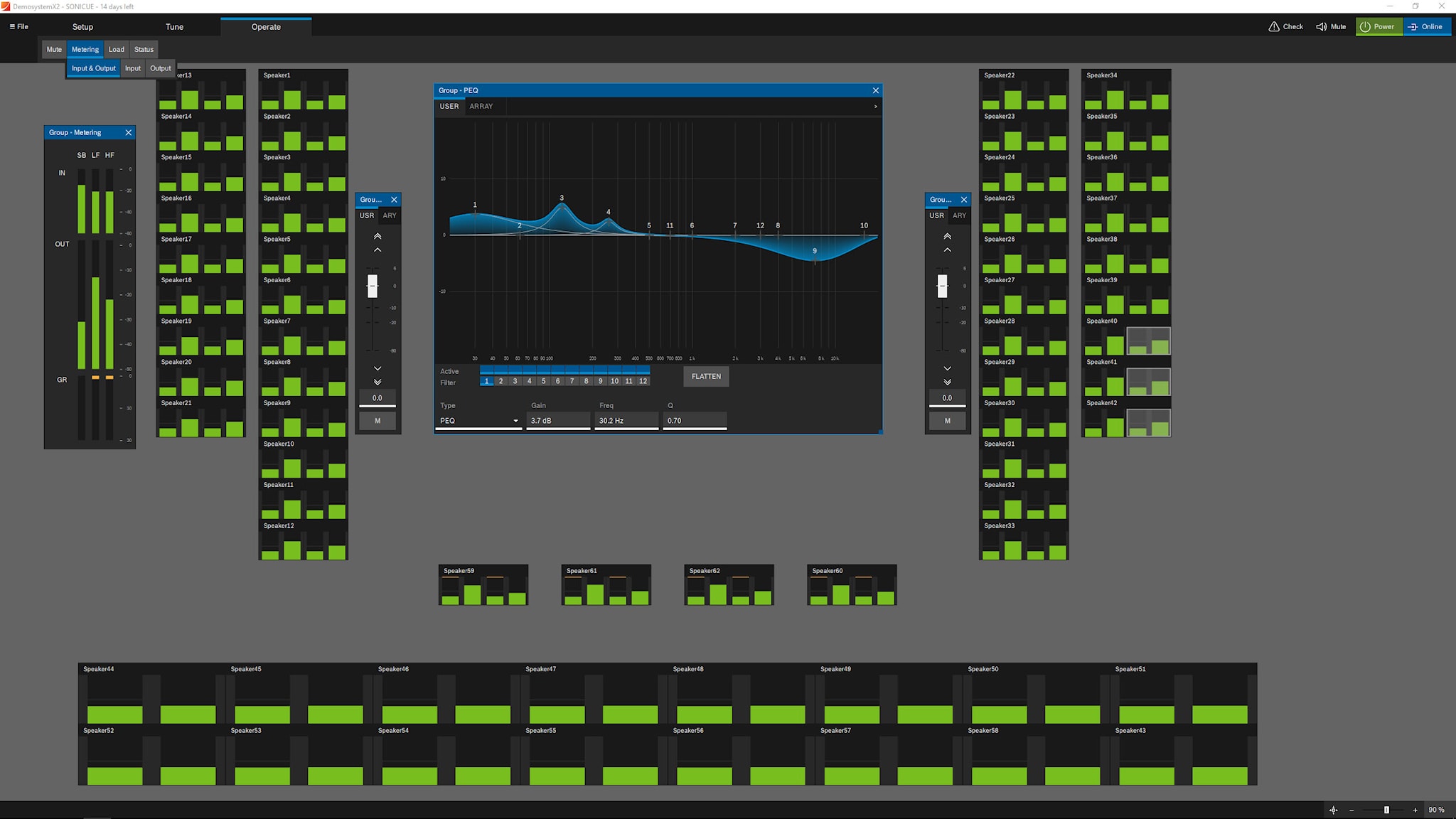
SONICUE's new user interaction design ensures operators have direct access to every sound system parameter, even directly from the loudspeakers managed in dedicated speaker databases. A unique multi-stage flyout concept makes it easy to retrieve the perfect overview and adjust while monitoring other parameters without the need to close menus.
Dedicated loudspeaker databases include models of the following manufacturers View the dedicated speaker databases
The Task Engine in SONICUE running on MXE Matrix Mix Engine allows complex system functions for control, monitoring and supervision without programming knowledge. User control panels run independently in SONICUE Control, the panel viewer app for PCs, iOS devices, as well as the TPC-1 and WPN1 controllers. SONICUE’s panel designer provides all the tools to create customized control GUIs dedicated to the individual needs of the end user. SONICUE is a system-based solution, which can be immediately understood by users at every level, helping them get the job done no matter how simple or complex it may be.
Features
SONICUE's new user interaction design ensures operators have direct access to every sound system parameter, even directly from the loudspeakers managed in dedicated speaker databases. A unique multi-stage flyout concept makes it easy to retrieve the perfect overview and adjust while monitoring other parameters without the need to close menus.
Dedicated loudspeaker databases include models of the following manufacturers View the dedicated speaker databases
The Task Engine in SONICUE running on MXE Matrix Mix Engine allows complex system functions for control, monitoring and supervision without programming knowledge. User control panels run independently in SONICUE Control, the panel viewer app for PCs, iOS devices, as well as the TPC-1 and WPN1 controllers. SONICUE’s panel designer provides all the tools to create customized control GUIs dedicated to the individual needs of the end user. SONICUE is a system-based solution, which can be immediately understood by users at every level, helping them get the job done no matter how simple or complex it may be.
<ul><li>New, smooth way of working with new Dynacord devices in OCA-controlled (AES70) sound systems, and more.</li><li>Intuitive, guided workflow to design, control, and supervise small to large sound systems</li><li>Integrated system visibility and direct access – see parameters system wide in “speaker view” and permanently editable – if required</li><li>Dedicated interaction design featuring a time-saving fly-out concept</li><li>SONICUE Control for customized control panels running as standalone applications on PCs, TPC-1 or iOS devices</li><li>Supports of the powerful Task Engine in MXE5 for creation of advanced tasks without coding skills</li><li>Working with loudspeaker data libraries of Electro-Voice and other loudspeaker brands</li></ul>
Specifications
Software
- Current version
1.6
- Platform
- Windows
- Teaser
<p>SONICUE brings powerful control, monitoring, and configuration tools together in one professional software platform. Gain real-time insight into your audio system, make adjustments with confidence, and manage complex deployments with ease. Everything you need to keep your system running smoothly.</p>
- What's new
<ul><li>Automixer & Ducker for IX Series</li><li>New TaskEngine blocks (MXE5, IX)</li><li>SONICUE Control panels for Android devices</li></ul>
- Release history
<ul><li>1.5 Support for IX series amplifiers, 1.5.1 patch release including Speaker Database Creator</li><li>1.4 Support for the MXE5-64. New DSP blocks added: Auto Mixer, Automatic Gain Control (AGC) and Ambient Noise Compensation (ANC). Scene handling in TaskEngine, web viewer function for SONICUE Control.</li><li>1.3 Free DSP configuration for MXE5. Update of system logic to Task Engine for more sophisticated and complex system control and integration.</li><li>1.2.4 Support for the WPN1 networked wall panel controller; operational parameters for IPX and TGX amplifiers available for designing control panels in SONICUE’s panel designer; MXE logic featuring active HTTP API, scheduler and other enhancements.</li><li>1.2.2 Support for SONICUE Control panel viewer on iOS devices, enhanced functionality in Panel Designer, real time load monitoring for amplifiers and TPC-1 service tool.</li><li>1.2 Support for MXE5 matrix mix engine with 24-ch zone mixer overlay. Adding system logic (GPIOs and virtual commands) for MXE and IPX and SONICUE Control viewer app for customized user control panels for PC operators and TPC-1 touch panel controller.</li><li>1.1 Supports Dynacord L- and C- Series amplifiers with upgraded DSP functionality</li><li>1.0 Initial release supporting Dynacord’s TGX, IPX series amplifiers as well as amplifiers equipped with RCM-28 module</li></ul>
System requirements
- Supported operating systems
Windows 10/11, 64-bit